

Description
Direct Google Maps Driving Directions in Browser
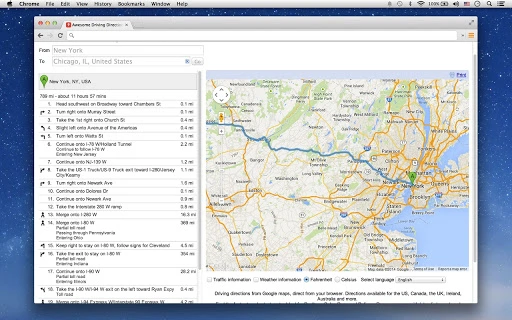
Driving directions from Google Maps are now accessible directly from your browser with this streamlined tool. Designed for professionals who frequently visit multiple locations—such as real estate agents, sales representatives, and delivery personnel—this application simplifies route planning without requiring app installations. It enables users to find the fastest or shortest route between destinations with ease. Real-time traffic and weather data are integrated, offering situational awareness during travel. The tool supports printing of route details, making it practical for field reports or client presentations. It is available for both Windows and Mac, ensuring broad accessibility. While specific system requirements were not provided, the lightweight footprint of 500KB suggests minimal resource impact. This solution is ideal for users who rely on efficient navigation and need to manage multiple stops across the US, Canada, the UK, Ireland, Australia, and other supported regions.
Key Features & Capabilities
- Direct Google Maps Integration – Access Google Maps driving directions instantly from your browser, eliminating the need to open a separate app or website.
- Route Optimization – Choose between fastest or shortest routes based on current traffic conditions and road networks.
- Real-Time Traffic & Weather Data – View up-to-date traffic flow and weather conditions along your planned route.
- Multi-Location Planning – Efficiently plan trips involving multiple stops, ideal for field professionals managing numerous appointments.
- Printable Route Output – Generate and print route details for offline use, client handouts, or record-keeping.
- Global Coverage – Supports routing across the US, Canada, the UK, Ireland, Australia, and additional international regions.
These features are particularly useful for real estate agents showing multiple properties in a day, sales reps visiting clients across a region, or delivery personnel optimizing daily routes. The ability to access accurate, up-to-date information directly from the browser enhances workflow continuity and reduces context switching. Users can quickly adjust routes on the fly based on traffic or weather changes, improving travel efficiency. The integration of printing functionality adds value for documentation and reporting needs. While specific performance benchmarks were not provided, the application’s lightweight design suggests fast loading and responsive behavior. Its core functionality remains focused on navigation accuracy and usability, making it a practical tool for time-sensitive tasks.
User Interface, Workflow & Performance
The user interface is designed for simplicity and direct access to core navigation functions. Users can input start and end points through a clean, intuitive form, with auto-suggestions for locations. The layout emphasizes clarity, prioritizing route results and key data such as estimated time, distance, and traffic conditions. Navigation between inputs and outputs is straightforward, minimizing steps required to generate a route. Workflow efficiency is enhanced by the ability to add multiple stops and instantly recalculate routes. The tool operates entirely within the browser, relying on Google Maps’ backend services for data processing. As a result, performance is largely dependent on internet connectivity and the responsiveness of the host browser. The developer did not specify resource usage details, but the 500KB file size indicates minimal impact on system performance. Stability appears consistent with browser-based tools, though exact behavior under prolonged use was not documented. General software behavior patterns suggest reliable operation for typical use cases.
Compatibility & System Requirements
This software is compatible with both Windows and Mac operating systems, offering broad accessibility for desktop users. The application is delivered as a browser-based tool, meaning it does not require a traditional installation process. The file size is listed at 500KB, which reflects a lightweight footprint. However, exact system requirements were not listed. The developer did not provide additional system requirements, including CPU, RAM, or specific OS versions. Compatibility information is limited to the operating systems mentioned. Users should ensure their browser is up to date to maintain optimal functionality. While the tool is designed to work across platforms, performance may vary based on individual device capabilities and internet speed. No specific hardware requirements were provided, so users are advised to test the application in their environment. The absence of detailed technical specifications does not indicate a limitation but reflects the nature of browser-based tools, which rely on the host system’s capabilities.
Pros and Cons
Pros
- Direct access to Google Maps driving directions from the browser
- Supports fastest and shortest route options with real-time traffic data
- Includes weather information for better travel planning
- Printable route outputs for documentation and reporting
- Lightweight design at 500KB with no installation required
- Available for both Windows and Mac users
Cons
- Exact system requirements were not specified
- Performance details are not provided
- Dependent on stable internet connectivity
- Browser-based operation may limit offline functionality
- No information on update frequency or support lifecycle
FAQ Section
Is this software compatible with Windows and Mac?
Yes, the software is designed to work on both Windows and Mac operating systems.
Does it require installation?
No, the tool operates directly in your browser and does not require a traditional installation process.
Can I use it offline?
Due to its browser-based nature and reliance on Google Maps services, the application requires an active internet connection. Offline usage is not supported.
Is the software secure to use?
As a browser-based tool that leverages Google Maps, it uses standard web security protocols. Users should ensure their browser and network are secure.
How often are updates released?
The update frequency was not specified by the developer. Users should check for the latest version through the official source.
Final Thoughts
This browser-based driving directions tool delivers a focused, efficient solution for professionals managing multiple travel destinations. Its direct integration with Google Maps, combined with real-time traffic and weather data, provides valuable situational awareness. The ability to print route details adds practical utility for field teams and client-facing roles. While detailed technical specifications are limited, the lightweight design and cross-platform availability make it accessible to a wide audience. The absence of installation and minimal resource demands enhance usability. For real estate agents, sales representatives, and delivery personnel, this tool streamlines route planning and improves on-the-go productivity. It is a reliable choice for those who need quick, accurate navigation without the overhead of a full desktop app. Download Direct Google Maps Driving Directions in Browser now.
Guides & Tutorials for Awesome Driving Directions App for Chrome
How to install Awesome Driving Directions App for Chrome
- Click the Preview / Download button above.
- Once redirected, accept the terms and click Install.
- Wait for the Awesome Driving Directions App for Chrome download to finish on your device.
How to use Awesome Driving Directions App for Chrome
This software is primarily used for its core features described above. Open the app after installation to explore its capabilities.
User Reviews for Awesome Driving Directions App for Chrome 0
No reviews found





